Music Player & MP3 - DDMusic
- 4.6
- Rating
- 100.00M
- Installs
- Free
- Price

 Analysis by App-foxy
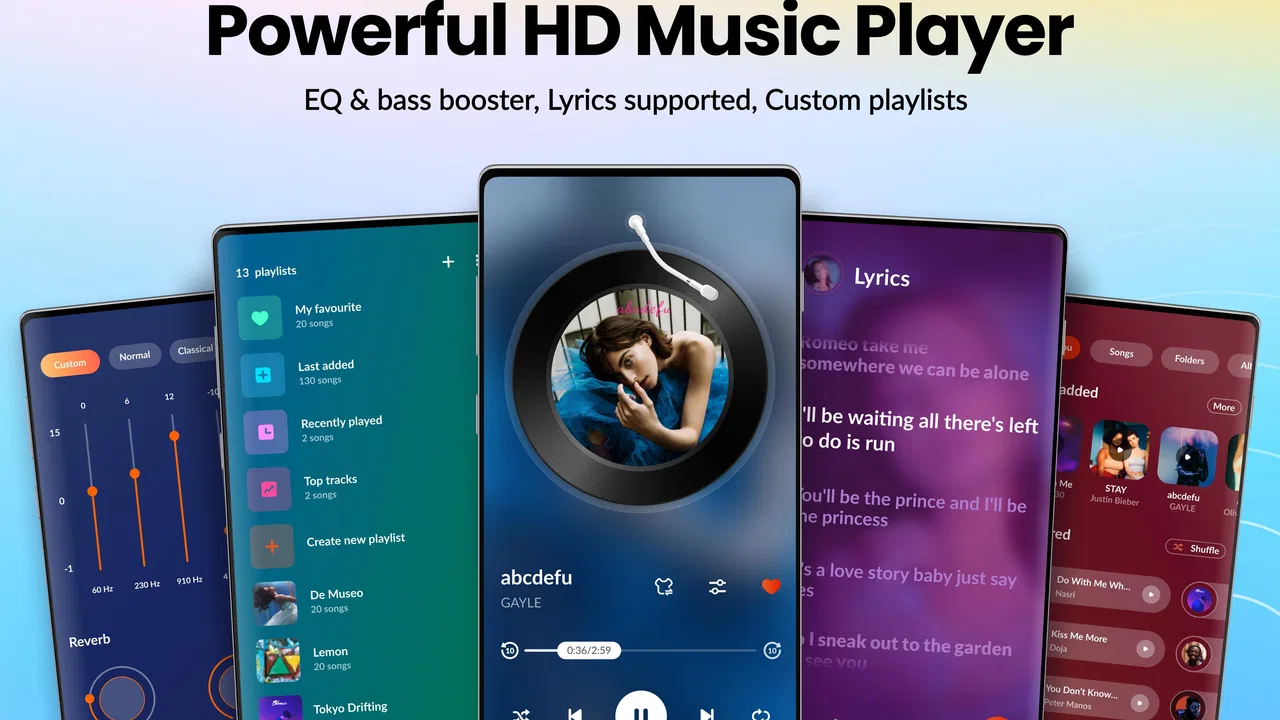
I usually judge a music player by what happens after the first tap: can I get from a messy phone library to the right song without fighting the interface? That is the practical question I brought to Music Player & MP3 - DDMusic. It is a free Music & Audio app from Hitchhike Tech, aimed at people who already keep audio files on their device and want a more focused way to listen to them. Its appeal is straightforward: local playback, lyrics, equalizer controls, and offline listening in one place.
That focus matters because DDMusic is not trying to replace every streaming service. I see it as a companion for an existing collection of MP3 files, downloaded music, and other audio that I want available without depending on a connection. The app is rated for Everyone, works on Android six and later, and its current version is 2.6.1. Those details make it accessible on a broad range of Android phones, including older devices that may not handle heavier music platforms comfortably.
From a scattered music folder to a usable listening routine
My starting point with a local music player is rarely ideal. A phone may contain tracks copied from a computer, recordings saved by another app, albums with inconsistent tags, and files that I only need temporarily. A good player should reduce that clutter rather than make me reorganize everything before listening. DDMusic is best understood in that situation: it gives the local library a dedicated front end instead of forcing me to browse folders every time.
You May Also Like

 AccuWeather: Weather Radar
AccuWeather Review: A Quick, Clear Forecast for Everyday Decisions
For everyday plans, the best forecast is the one you can understand quickly. AccuWeather makes rain timing, radar, and local conditions easy to act on, with a few trade-offs.

 Hill Climb Racing
Why Hill Climb Racing Still Turns Crashes Into One More Run
A tiny car, a bumpy hill and one more upgrade: Hill Climb Racing keeps resurfacing because its simple chaos makes every near-miss feel personal.

 AliExpress - Shopping App
AliExpress Makes Global Shopping Feel Personal, but Shoppers Bear the Risk
AliExpress turns a global marketplace into a pocket-sized discovery engine. Its reach is useful, its shopping loop compelling, and its trade-offs easy to miss.

 Lords Mobile: Kingdom Wars
Lords Mobile Is a Kingdom-Building Routine, Not a Quick Match
A case-by-case verdict on the building, battles, device demands, and social commitments that make Lords Mobile rewarding for some players and exhausting for others.

 PDF Scanner app - TapScanner
TapScanner Makes Paperwork Easier to Capture, Check, and Share
TapScanner makes scanning with a phone feel less like a rescue operation and more like a dependable step in getting work done. Its capture tools are useful, though not flawless.

 Block Blast!
 Shows How Much a Puzzle Game Can Leave Out
A quiet grid game shows why puzzle players increasingly value instant clarity, repeatable skill and low-pressure play—and where the genre still needs to catch up.
More From Our News Desk
View All News


The first useful habit is to let the app become the place where I begin playback, rather than opening individual files from a file manager. Once the library is available, I can approach music by the way I actually think about it: an artist, an album, a song, or a saved listening queue. That is a small change, but it turns a pile of files into something closer to a personal collection.
I would not install it expecting a catalog of songs to appear automatically. The app is a player, not a replacement for a music subscription. The music still has to be available on the device through a source I control. For someone who mainly streams, that distinction is important. For someone with a carefully built offline library, it is the reason the app makes sense.
The next step is checking whether the library looks sensible. File names and embedded tags do much of the organizational work, so inconsistent metadata can create duplicate artists or albums that are really the same thing. DDMusic can make playback easier, but it cannot magically turn badly labeled files into a perfectly arranged archive. I recommend cleaning the most frequently played albums first instead of trying to repair an entire collection in one sitting.
That approach exposes one of the app’s practical strengths: it is useful even when the library is not perfect. I can start with a few dependable folders, test the playback experience, and gradually improve the collection. This is more realistic than treating setup as a one-time project. The app becomes valuable during the transition from disorganized storage to a more deliberate offline library.
Building the listening path one choice at a time
After selecting music, the workflow moves from finding tracks to shaping how they sound. The built-in equalizer is the feature I would explore before changing any files. It gives me a way to adjust the listening experience for different situations, such as quiet evening listening, a small phone speaker, or headphones that make bass feel too strong. I prefer making modest changes rather than pushing every control to its limit, because aggressive adjustments can make vocals tiring and expose distortion in lower-quality files.
This is also where DDMusic feels more useful than a basic file-opening tool. A file manager can launch a song, but it is not designed around repeated listening or sound adjustment. The player puts these decisions closer to playback, which saves time when I want to move from one album to another without opening separate utilities.
Lyrics add another layer to the same workflow. When lyrics are available for a track, they can make the app more engaging for sing-alongs or for following unfamiliar songs. I would treat lyric support as a helpful part of the listening screen rather than a reason to expect every local file to behave like a fully synchronized streaming release. The quality of the experience depends on the song and the information attached to it.
A useful everyday scenario is a commute through areas where I do not want to rely on mobile data. Before leaving, I choose a few albums or playlists that are already stored locally, adjust the sound for my headphones, and start playback. On the journey, the app’s offline orientation is more valuable than discovery features. I am not searching for something new; I am trying to keep a predictable soundtrack available when a connection is weak or inconvenient.
The same workflow works for travel, studying, exercise, or a long flight, but the reason changes slightly each time. During study, a prepared album avoids the distraction of browsing. On a trip, local files reduce dependence on coverage. At home, the equalizer can help compensate for the limitations of a particular listening setup. These are not dramatic features, but they are the kinds of small decisions that determine whether a player stays installed.
Where the handoffs happen
The most important handoff is between the place where music is obtained and the place where it is played. DDMusic handles the second part. If I receive a legitimate audio file through another app or transfer it from a computer, I then need to make sure it is stored where the player can use it and that the library can recognize it. This separation is easy to overlook when comparing a local player with an all-in-one streaming service.
Streaming apps usually handle discovery, licensing, downloads, recommendations, and playback as one connected system. DDMusic is more direct. I bring my own files, and the app gives me tools to listen to them. That can feel refreshingly simple, but it also means I am responsible for the organization that a subscription service normally hides from me.
Another handoff occurs when I move between headphones, a vehicle, and the phone speaker. The equalizer can help, but I should not expect one setting to suit every output. I find it better to use a restrained general profile and make small changes for the environment instead of constantly rebuilding the sound. The advantage is control; the trade-off is that control asks for a little attention.
Lyrics create a similar handoff between the audio file and the information shown alongside it. If the track is identified cleanly, the surrounding experience feels more complete. If the file is poorly labeled or unusual, I may spend more time checking what is playing than I would in a tightly integrated streaming catalog. That is not a deal-breaker for me, but it is a reminder that local playback depends on the quality of the library behind it.
For households or users with several devices, I would also think carefully about where the main collection lives. A local player is excellent when the music is on the phone I am carrying. It is less convenient when I expect automatic synchronization across phones, tablets, and computers. In that situation, a streaming service or a broader media-management system may be the better fit, even if it offers less direct control over individual files.
What the finished result feels like
When the setup is done well, the result is a focused listening loop: open the player, choose music from the local collection, make a sensible sound adjustment, check lyrics when useful, and continue offline. I like that this loop does not depend on recommendations or an account-based catalog. It puts my own music first, which is exactly what I want when I already know what I intend to hear.
The app’s large audience suggests that this approach has broad appeal. It has an average rating of 4.6 from around 1.4 million ratings and has passed 100 million installs. I would not treat popularity as proof that it suits every listener, but it does show that a straightforward offline player can remain relevant beside streaming-heavy alternatives.
DDMusic is especially appealing for people who have collected MP3 files over time and want a cleaner daily experience than browsing storage folders. It also suits listeners who care about staying offline, users with limited connectivity, and anyone who wants an equalizer close to the playback controls. The free entry point makes it easy to test without committing to a subscription, although optional in-app purchases range from $1.99 to $11.99 per item.
That purchase model is worth considering before making the app part of a long-term routine. The basic idea is accessible without an upfront charge, but some users may eventually encounter paid extras. I would decide based on whether the free experience already solves the main problem: reliable local playback. If it does, there is no reason to assume that paying is necessary simply because additional options exist.
Version 2.6.1 is also a practical detail for anyone troubleshooting. If the app behaves differently from an older review or tutorial, checking the installed version is a sensible first step. Android compatibility begins at version 6.0, so owners of much older phones should verify that their device can run it before planning a library migration.
Where I would choose something else
The flow breaks most clearly when I want discovery rather than playback. If my main goal is to find new artists, follow editorial playlists, receive recommendations, or move between devices without thinking about file locations, a streaming platform is more convenient. DDMusic can play what I have; it is not the right tool for replacing the entire discovery ecosystem.
It may also be a poor match for someone who dislikes managing metadata. A local collection rewards a little housekeeping. Incorrect artist names, missing album information, and scattered folders can make browsing feel less polished. If I want every release to arrive with consistent artwork, lyrics, and organization automatically, I would probably prefer a service that manages those details centrally.
Audio enthusiasts should keep their expectations realistic as well. An equalizer is useful, but it cannot restore detail lost in a heavily compressed file, and it cannot turn a phone speaker into a dedicated sound system. I would use it to correct a listening setup, not as a promise of studio-quality output from every track.
There is also a convenience trade-off in offline ownership. Local files are dependable once they are prepared, but preparation takes time. I need to decide what belongs on the phone, keep enough storage available, and occasionally update the collection. Streaming downloads can feel easier for people who already pay for access and regularly rotate what they listen to.
My advice is to test the app with a small, representative library rather than importing everything immediately. Include an album with clean tags, one with imperfect organization, and a few individual tracks. Try the same music through headphones and the phone speaker, then use the lyrics and equalizer during normal listening instead of treating them as checklist features. This quickly reveals whether the player fits your habits.
If the small test feels natural, the next improvement is to create a repeatable intake routine. When adding new music, keep related files together, use consistent artist and album names, and avoid leaving multiple copies in different folders. That simple discipline makes the app’s browsing experience noticeably more useful over time and prevents the player from becoming another layer of clutter.
I would also prepare offline listening before I actually need it. Choosing music at the last minute, while leaving for a trip or entering a poor-coverage area, defeats much of the point. A short pre-trip check—open the app, start an album, skip between tracks, and confirm the intended files are present—can prevent an awkward search later.
After using it in that way, I see DDMusic as a practical Android music player rather than an all-purpose music universe. Hitchhike Tech has kept the central experience understandable: use your own audio, listen without a connection, adjust the sound, and view lyrics when they fit the track. The limitations are tied to that same design. You give up the effortless catalog and cross-device handoff of streaming in exchange for more direct control over local music.
My recommendation is simple: choose it if your music already lives on your phone and you want a focused offline player with useful playback tools. Skip it if discovery, automatic synchronization, or hands-off library management matters more than control. For the right starting condition, the path from stored file to finished listening session is pleasantly short, and that is the app’s strongest result.
FAQs for Music Player & MP3 - DDMusic
01What features does Music Player & MP3 - DDMusic offer?
Music Player & MP3 - DDMusic provides a wide range of features including high-quality audio playback, customizable playlists, an intuitive user interface, and support for various audio formats such as MP3, WAV, and FLAC. It also includes an equalizer with presets for different music genres, enhancing your listening experience.
02Is Music Player & MP3 - DDMusic compatible with all Android and iOS devices?
Music Player & MP3 - DDMusic is designed to be compatible with most Android and iOS devices. However, it's always a good idea to check the app's system requirements on the Google Play Store or the Apple App Store to ensure it will work smoothly on your device before downloading.
03Does Music Player & MP3 - DDMusic require an internet connection to play music?
No, Music Player & MP3 - DDMusic does not require an internet connection to play music files stored locally on your device. However, some features like cloud integration or streaming options might need internet connectivity to function properly.
04Are there any in-app purchases or ads in Music Player & MP3 - DDMusic?
Music Player & MP3 - DDMusic is a free app, but it may include ads to support development. There might also be in-app purchases available for users who prefer an ad-free experience or want to unlock additional premium features, such as advanced equalizer settings or exclusive themes.
05How can I create and manage playlists in Music Player & MP3 - DDMusic?
Creating and managing playlists in Music Player & MP3 - DDMusic is straightforward. You can easily add songs to a new or existing playlist by selecting them from your library. The app allows you to reorder songs, rename playlists, and even share them with friends, making your music experience highly personalized and convenient.
Pros
- User-friendly interface for easy navigation.
- Supports a wide range of audio formats.
- Customizable playlists and themes.
- Offline playback for convenience.
- High-quality audio output settings.
Cons
- Contains ads that can be intrusive.
- Limited features in the free version.
- Requires frequent updates for stability.
- No support for cloud storage integration.
- Some features can be confusing to new users.

Music Player & MP3 - DDMusic
Gallery